iPhone 18 Pro and Pro Max: Apple event 2026 summary
- Apple Event
- iPhone
- iPhone 18 Pro
- iPhone 18 Pro Max
- Phishing
- Online Shopping
- Australia
Event summary. Updated 10 September 2026, 5:14am AEST. Sources checked through 5:12am AEST.
This guide was prepared with AI assistance. Check the linked official sources for current product details.
Apple has announced iPhone 18 Pro and iPhone 18 Pro Max, starting at A$2,099 and A$2,299 in Australia. This summary uses Apple's official release, its Australian store and original product images. It covers the new phones, iPhone Duo, AirPods and Watch announcements, plus checks to make before trusting a launch offer.
iPhone 18 Pro and Pro Max preorders open at 10pm AEST on Saturday 12 September, with availability from Friday 18 September. Apple Australia confirms the local schedule. The listed prices are starting amounts; storage choices and your delivery estimate need checking at the local checkout.
The possible scam scenarios below are preventive examples, not reports of incidents at this event. Already paid a suspicious seller or shared account details? Use our steps after a suspected scam. An optional Scam Checker review can organise warning signs, but cannot authenticate a seller or guarantee a safe purchase.
iPhone 18 Pro and Pro Max: key features announced
- Chip: A20 Pro, using a 2nm process.
- Camera: 48MP Fusion Main camera with variable aperture and manual Pro controls.
- Display interface: a smaller Dynamic Island supporting three Live Activities.
- Choices: black, silver, glacier and burgundy; 256GB, 512GB, 1TB and 2TB storage.
These are Apple's announced specifications. This article does not provide hands-on testing, camera comparisons or independently measured battery results. Check the precise regional model before relying on any battery figure or service demonstration.
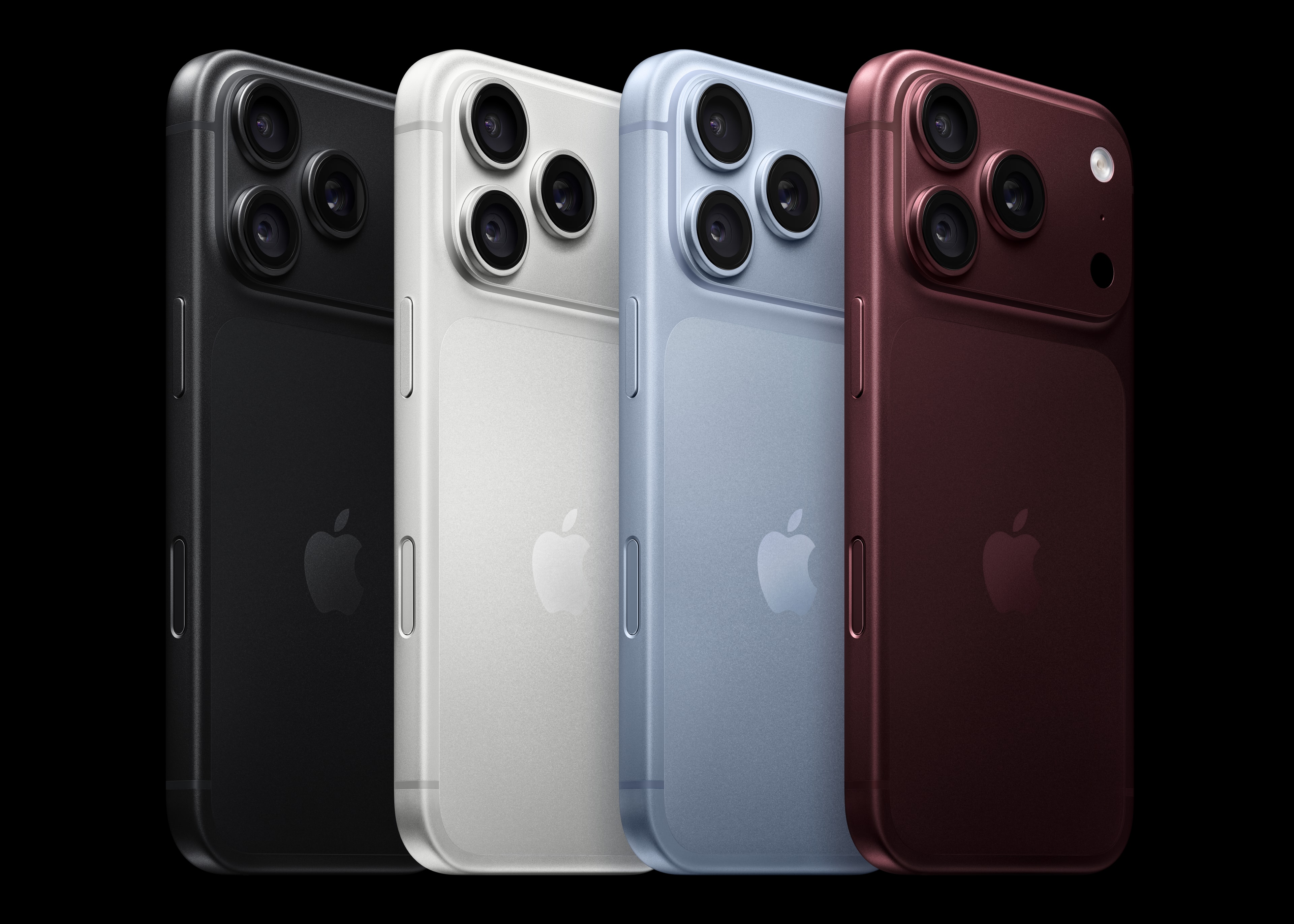
iPhone 18 Pro Australia price, preorder and release date
Preorder: 12 September, 10pm AEST. Availability: 18 September. Those dates come from Apple's published schedule, which includes Australia. The release date is not a promise about when an individual retailer will deliver your order.
Australian starting prices: iPhone 18 Pro A$2,099; iPhone 18 Pro Max A$2,299. These are the amounts listed by Apple's Australian store, not converted US prices. Match the model and capacity before comparing an offer; higher-storage configurations can cost more.
Before paying for an iPhone 18 Pro or Pro Max, use this short comparison note:
- Model and storage: match the exact Pro or Pro Max configuration on the seller's own checkout.
- Australian price: check the full amount in AUD, including any additional charges.
- Preorder opening: verify the Australian date, time and time zone published by the seller.
- Availability: establish whether the date means first release, dispatch or your delivery estimate.
- Seller and payment: identify the business taking payment and read the written purchase terms.
Start from Apple's Australian website and navigate to its local store, or independently open the retailer you intend to use. Do not pay a deposit merely because a message says it can reserve stock before the normal checkout opens. Our online-seller verification guide explains how to assess the business and offer together.
Official iPhone photos and seller verification
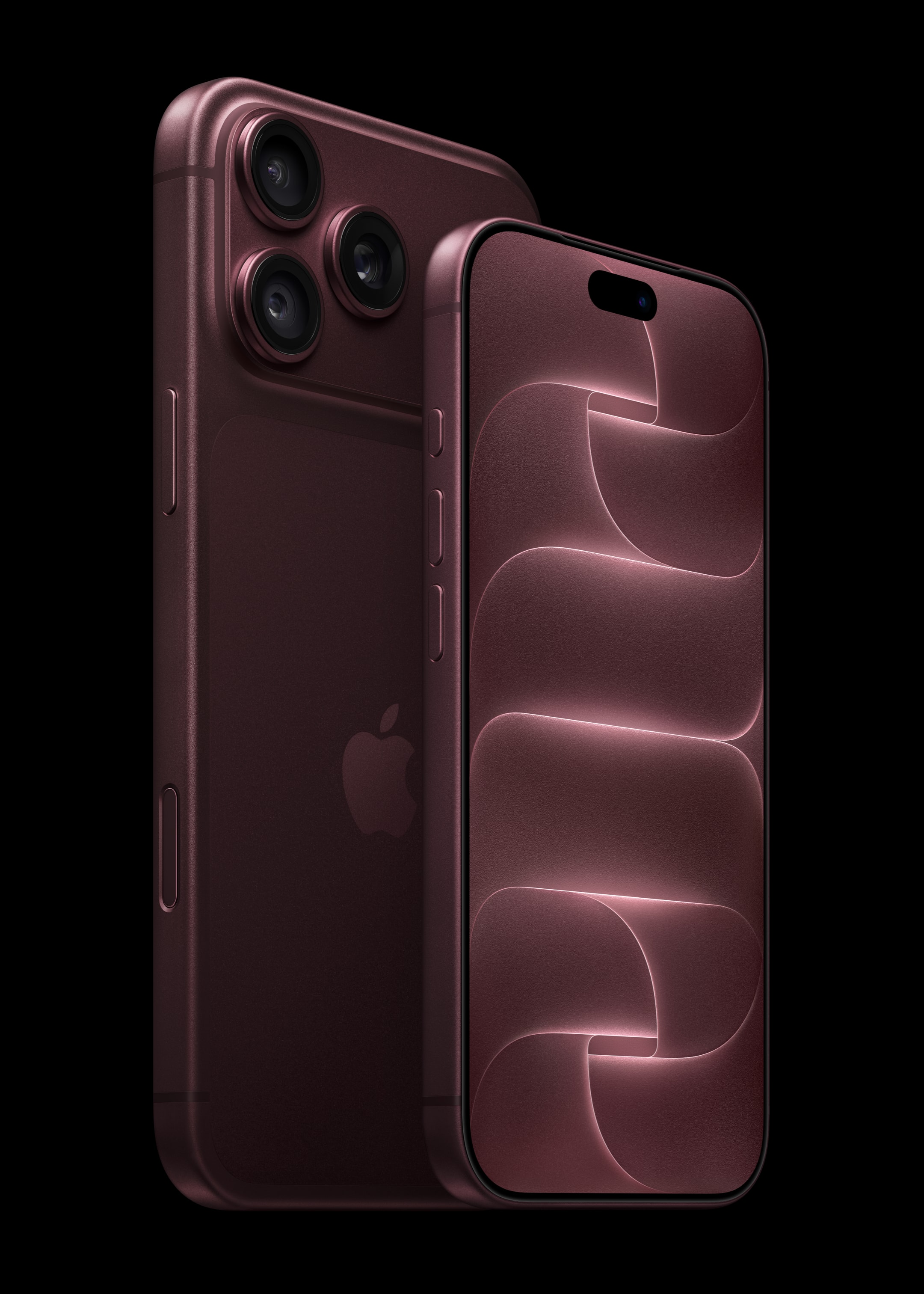
A real product photograph can be copied into an unrelated advert. The images above illustrate Apple's announcement; they cannot prove that another seller holds stock, represents Apple or will deliver your order. Match a listing to a verified seller and understandable sale terms. Our suspicious preorder-link checks can organise warning signs without approving a purchase.
Does Apple Reference Image prove a phone listing is genuine?
Apple describes Reference Image as an opt-in feature producing a signed reference photo for comparison with an edited version; regional restrictions apply. Apple's explanation.
For a buyer, image provenance and seller identity answer different questions. An authentic photograph could be reused without permission, depict somebody else's device, or accompany a misleading description. A screenshot claiming that an image was verified is also just another claim until you can establish what was checked.
Do not treat a reference image, an AI label or its absence as a verdict on a transaction. Ask who is selling, what is actually included, how payment works and what evidence connects that person to the device. This launch feature offers a useful reason to discuss image authenticity, but it does not remove the need to verify an offer independently.
iPhone Duo: Australian price and October launch
Apple's new iPhone Duo has a 5.4-inch outer display and a 7.6-inch inner display when opened. Its announcement also confirms A20 Pro, Touch ID in the side button and an eSIM-only design. Carrier compatibility still needs checking for the service you use. Apple's official Duo release.
iPhone Duo starts at A$3,499 in Australia, according to Apple's local store. Preorders open on 16 October at 11pm AEDT in Sydney and Melbourne, or 10pm AEST in Brisbane, with availability from 23 October. These are October dates, separate from the Pro models' September launch. Check the final configuration and delivery estimate before buying. Apple Australia.

Apple Pencil (USB-C) support is planned for later in 2026. Do not assume it works at launch when comparing a bundle. An unsolicited request to activate an eSIM is also a separate claim to verify through your carrier's own app or website.
AirPods 5 and Apple Watch: other announcements
- AirPods 5: Apple's Australian prices are A$219 including GST, or A$249 including GST with the Wireless Charging Case. Both have Active Noise Cancellation; the wireless-case version adds volume swipe and longer battery life. Australian preorders begin 10 September, with availability from 18 September. Australian AirPods announcement.
- Apple Watch Series 12: Apple announced S11, a new Health Sensing System and a readiness score, with 42mm and 46mm choices. Australian prices start at RRP A$649 including GST. Australian Series 12 announcement.
- Apple Watch Ultra 4: S11 and the same sensing and readiness features are joined by natural and black titanium options. Australian prices start at RRP A$1,349 including GST. Australian Ultra 4 announcement.
Both Watch models have Australian preorders from 10 September and store availability from 18 September. These are manufacturer announcements; this article does not assess medical accuracy or provide hands-on testing.
Australian buying limitation: Apple says hypertension notifications will be unavailable initially on Series 12 and Ultra 4 in Australia. Availability is expected later in 2026, subject to additional regulatory clearances. Check this condition before buying for that feature. Apple's Australian availability note.
For a possible offer, match the AirPods charging-case version or Watch configuration before comparing prices. Check the seller, total AUD amount and delivery terms independently using our online-store checks. A copied product photograph or a promise of early Duo stock does not establish that a seller can fulfil an order. These are preventive buying checks, not reports of scams observed during the event.
Apple event time in Australia and official viewing links
Apple listed 3am AEST on 10 September 2026 for this event. Sydney, Melbourne, Brisbane, Canberra and Hobart share that time. The corresponding times are 2:30am in Adelaide and Darwin and 1am in Perth, calculated from Apple's listed AEST time. The United States dates the event 9 September. Official Australian viewing page.
A video title or search advert using Apple's name does not establish who operates the linked website or payment form. For a buying decision, distinguish the announcement, when orders open, when deliveries begin and what a particular retailer offers. Keep unanswered items open until you can check them through the source responsible for that detail.
How This Scam Works
The risk to consider is an offer borrowing the event's name to make an unrelated request feel timely. The following are invented situations for checking your next action, with no working scam links, identified offenders or claimed victim numbers.
A livestream that asks for a payment. Imagine selecting a video titled as an Apple keynote, then being told to register a card to keep watching. Your immediate question is not whether the video looks professional. It is whether you reached it from the organiser's own viewing page. Close the request and restart from that page. A video title alone does not answer who operates a payment form.
A giveaway in the comments. Imagine a comment saying you have been selected for a phone, followed by an instruction to contact a separate account. Before considering any fee or form, ask where the actual promotion rules are published and whether the named organiser independently confirms it. Apple identifies fake product prizes among its general scam examples; that warning is not confirmation of a giveaway scam at this event. Apple's guidance.
A preorder that skips the basic questions. Imagine a seller promising an unverified configuration if you send a deposit during the keynote. Write down the missing facts: exact product, seller identity, total payable, delivery commitment and cancellation conditions. If you cannot verify those independently, leave the purchase unfinished. Watching an announcement and agreeing to a sale are separate decisions.
An order problem after the stream. Imagine a message claiming your payment failed even though you have not placed an order. Check your own record first. If you did order, open the seller's site or app through the route you used originally. The useful comparison is with your real transaction, not with an order number supplied by the unexpected message.
Who Is Being Targeted
This is a preventive guide for viewers, prospective buyers and people selling an older phone. It does not establish a measured target group or an increase in event-related fraud. A reader may encounter a questionable request at several different points: while looking for a stream, comparing a deal, waiting for a delivery or arranging a trade-in.
The right check depends on that context. A person who has not bought anything can start by questioning an unexpected delivery claim. Someone waiting for a real parcel needs to compare the message with their actual order through a separate channel. The same wording can require different follow-up questions because the reader's own actions differ.
If you are helping someone else, ask what they were trying to do and where they stopped. Offer to take notes while they contact support themselves. Avoid asking for their passwords or taking control of the purchase. The aim is to help them make an informed next decision, including deciding to wait.
Red Flags to Watch For
Use these questions as a short pause before committing:
- Does a viewing page suddenly become a checkout? Return to the organiser's watch route and check the purpose of the request.
- Does the offer depend on facts that have not been announced? Ask for an independently verifiable source for the model, availability and price.
- Are you being moved into a private chat to finish an ordinary retail purchase? Establish who will take payment and what written sale terms apply before continuing.
- Does the request discourage contacting the company yourself? An explanation from the same sender does not independently verify its identity.
- Are account secrets being requested as part of support? Apple says it does not ask for your password or verification codes to provide support. Keep those private. Account-security guidance.
None of these questions depends on misspellings. A polished page can still leave the seller, purpose of a payment or requested action unclear. Equally, a confusing message is not enough evidence to publicly accuse a specific business. Record what you can actually support.
What to Do Before You Click, Reply, or Pay
- Choose your viewing route independently. Bookmark the official event page. If watching through an app, open the app you intended to use rather than following an unexpected installation instruction. Keep watching and shopping as separate activities so a sudden sales prompt does not become part of your viewing setup.
- Build a comparison note after an announcement. Record the exact model, capacity, Australian price and availability only once you can verify each one. Leave unknown items blank in your own note. A discount makes sense only when you know what product and sale terms you are comparing.
- Verify the seller through an independent route. Visit the retailer's known website or contact it using independently obtained details. Ask whether it offers the exact deal. Save the answer with the listing and terms if you choose to buy. A reply from the original account is still part of the request you are checking.
- Read the checkout as a commitment. Confirm the seller, full amount, product description and delivery terms before paying. If a page changes the recipient or arrangement, stop to resolve that change. Do not make a small payment merely to test an unknown seller.
- Keep a useful private record. Save the confirmation and record what you bought, from whom and when. Keep payment credentials, full identity documents and private account links out of public comments and checker submissions. A redacted description is enough to ask for general help.
For practice without opening a suspicious destination, use our fake-link guide and online-store checks. Tools can organise warning signs; a purchase still needs an independently verified seller and understandable terms.
Delivery and trade-in checks after the launch
Australia Post warns about messages asking for delivery fees and fake marketplace links or QR codes presented as a way to receive money. It advises using the AusPost app for delivery updates and provides scams@auspost.com.au for suspicious messages claiming to be from it. These are existing general warnings, not findings about Apple-event orders. Australia Post's scam alerts.
When a delivery message arrives, first identify which real order it could relate to. Compare it through the retailer or carrier's independently opened account. Avoid assuming that a message is connected to the new phone simply because the timing fits. Our parcel-message guide gives more examples of the questions to ask.
For a trade-in, use the instructions provided through the actual programme you selected. Apple has a preparation guide covering backup, transfer and removal of personal information. Follow the sequence for your device rather than improvising during a chat with a stranger. Do not manually delete synced photos or contacts as a substitute for the documented process; Apple's guide explains the effect on iCloud and connected devices. Apple's trade-in preparation.
If selling privately, agree on what the buyer receives, how payment is confirmed and when possession changes. Treat a new request to “release” payment as a separate question to verify. You can consult our Facebook Marketplace guidance before arranging the handover.
What to Do If You've Already Been Affected
Start with what you actually did. Seeing a message, opening a page, installing software, entering a password and making a payment are different actions. More than one may apply. Tell support the sequence without guessing about what happened behind the scenes.
If you paid or shared card details, contact your bank or card provider promptly through its official app or the number on your card. Ask what can be done about the transaction and the exposed account. Scamwatch recommends immediate bank contact and warns about follow-up approaches offering to recover money. A report does not guarantee a refund. Scamwatch's recovery steps.
If you entered your Apple Account password on a questionable page, use Apple's independently opened support route. Apple advises changing the password promptly and ensuring two-factor authentication is enabled. Do not send the password or a verification code to the person who contacted you. Apple's account advice.
If you installed something, stop using it to investigate. Make a note of the name and what you remember approving. Explain the installation to official support, using another trusted device if you are unsure about the one involved. This guide cannot diagnose the software or declare the device safe.
If you only opened a page, close it and record whether you entered anything or downloaded a file. Do not reopen it to make your account of the incident sound more complete. Use our recovery checklist to organise the next steps without publishing private information.
Where to Report
Apple lists reportphishing@apple.com for suspicious emails impersonating it; suspicious Apple-branded SMS messages can be reported by emailing a screenshot. Use the instructions on its reporting page. Keep actual passwords, security codes and unrelated personal information out of your report.
In Australia, Scamwatch's recovery page links to its scam-report form, online police reporting and IDCARE support. Account-protection requests should go to the relevant provider promptly; they serve a different purpose from notifying a public reporting service. Australian reporting and support options.
Report a misleading video or account through the platform where you encountered it as well. Keep a private screenshot and the page address if already available, but do not visit the suspect payment page to collect more evidence. For another country, use our global scam-reporting directory.
Frequently Asked Questions
What time is the September Apple event in Australia?
The event began at 3am AEST on 10 September 2026: 2:30am in Adelaide and Darwin, and 1am in Perth. The US date is 9 September, so the same keynote falls on different calendar dates in Australia and the United States.
Where can I find the official Apple event?
Start at Apple's official Australian event page linked above, or use the Apple TV app as Apple specifies. If a different page asks you to pay or supply account details, leave it and re-establish the viewing route independently.
Has Apple announced iPhone 18 Pro and Pro Max?
Yes. Apple's official release confirms both models. The key features and original Apple images above are sourced to that announcement.
What are the Australian price and release date?
iPhone 18 Pro starts at A$2,099 and Pro Max at A$2,299 in Apple's Australian store. Preorders open on 12 September at 10pm AEST, with availability from 18 September. Those are starting prices; check your selected configuration and delivery estimate at checkout. Duo has a separate October schedule, described above.
How do I check an iPhone 18 Pro preorder offer?
Independently open the seller's known website, match the exact model and storage, and read the total AUD price and delivery terms. Pause if the payment recipient changes or an unexpected message directs you to pay in a private chat.
Is every launch giveaway a scam?
This article does not make that claim. Verify the organiser and published terms independently before acting. A comment using a familiar name does not establish who runs a promotion. Do not treat a purported win as a reason to skip those checks.
Does a genuine product photograph prove a seller has the phone?
No. A photograph can help you understand what is being advertised, but it does not answer who controls the listing or whether that seller can fulfil an order. Verify those questions separately, even after official product photos are released.
Can Scam Checker approve an offer for me?
No. You can optionally check a suspicious link for warning signs, after removing private account tokens. The result is an assessment with limits, not an endorsement, proof of ownership or promise that a transaction is safe.
Related Scam Checker pages
- Check a suspicious message: organise warning signs in text you provide.
- How to spot a fake link: practise checking an address without trusting its branding.
- Is this website legitimate?: work through seller and checkout questions.
- Have I been scammed?: prioritise help after a payment or disclosure.
- Australian scam resources: find relevant tools and reporting routes.
Scam Checker is independent of Apple. This guide contains no paid placement, retailer endorsement or claim that the possible scenarios above have been observed during this event.